Temp Mail Chrome Extension
A temporary email address one click away in your toolbar. Generate a disposable address, copy it, and get a badge on the icon the moment a message arrives - without opening the site.
Free on the Chrome Web Store · Version 1.0.0 · 15 KB · Works in Chrome, Edge, Brave and other Chromium browsers
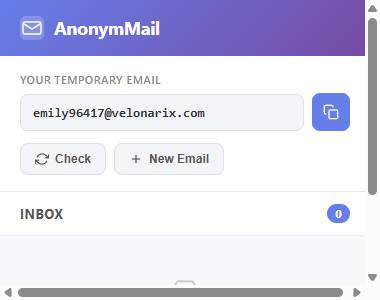
What the extension does
- Generate - one click creates a fresh address on one of the current AnonymMail domains.
- Copy - the address goes to your clipboard from the popup, so you can paste it straight into a signup form.
- Check - see the messages that arrived, and open any of them in a new tab to read the full content.
- Unread badge - the extension checks the mailbox in the background about once a minute and shows the number of new messages on the toolbar icon.
- New Email - throw the current address away and get another one whenever you want.
How to install it
- Open the Temp Mail – Free Disposable Temporary Email listing in the Chrome Web Store.
- Click Add to Chrome, then Add extension in the confirmation dialog.
- Pin the icon: click the puzzle-piece button in the toolbar and press the pin next to AnonymMail.
- Click the icon and press Generate Email. That is the whole setup.
What it can access
The extension only talks to anonymmail.net. It asks for three permissions: storage (to remember your current address), alarms (to run the background check) and cookies (to keep the same mailbox as the website). It does not read the pages you visit, does not inject anything into other sites, and sends nothing anywhere except to this service.
Same mailbox as the website
Because the extension uses your site session, an address you generate in the popup is the same one you see when you open anonymmail.net in that browser - and messages arrive in both places. The address follows the same rules as on the site: it stays valid as long as the domain does, and anything you read is stored only in your own browser.
Frequently asked questions
Does it work in Edge, Brave or Opera?
Yes. Any Chromium-based browser can install extensions from the Chrome Web Store.
Is there a Firefox version?
Not yet. The extension is built for Chrome's Manifest V3; a Firefox build is planned but not available.
Can I choose the domain?
The popup picks a domain for you from the current pool. To pick a specific one, use the website, where the address form lets you choose.
Does it cost anything?
No. The extension and the service are free, supported by advertising on the website.